
CASE STUDY: PET WEBSITE REDESIGN
OVERVIEW
What's the Problem?
Pinellas County Animal Services is an animal shelter that offers an online pet adoption process. Through our research, we have identified that users are frequently confused when navigating adoption websites and distrustful of the information provided, and this causes users to lose confidence in the online adoption process.

Redline Annotations & Usability
MY TEAM
My Role
Team Members: Ashley, Elise, James, & Amie
Background: Our UX/UI Design Bootcamp was tasked with re-designing a non-profit website in our area. Having chosen the Pinellas County Animal Services website, we conducted multiple interviews and gathered data from surveys regarding user experience with pet adoption resources online.

So what's the solution?
Through user research, testing, and iterations, we designed a new website for the Pinellas County Animal Services website that provides the user with a streamlined pet adoption process and easy access to resources and services provided by the shelter. We provided a new navigation system that is more intuitive and user friendly as well as a cleaner and more modern design.
USER RESEARCH


In order to get the most accurate and applicable user data, we conducted 5 user interviews for qualitative data and a survey of 13 questions where we received 21 responses for quantitative data.
User Research Data
We also conducted five interviews in order to gather qualitative data. This data was used to create our affinity diagram. This allowed us to identify common themes in pet adoption as well as user needs and interests.
AFFINITY DIAGRAM
After gathering the results from the survey and interview, we constructed an affinity diagram. This helped us categorize what was most important to
our users.

USER PERSONA

EMPATHY MAP


IDEATION AND BRAINSTORMING
STORY BOARD

SITE MAP
After conducting card sorting of the website, we created a site map of the newly defined navigation and sorted categories. This created a more cohesive and user friendly experience.

USER FLOW


PROTOTYPING (LOW-FI)
LOW-FI PROTOTYPES
We created some low-fi prototypes to test our new navigation system.

UI INSPIRATION MOOD BOARD
.png)
UI STYLE TILE
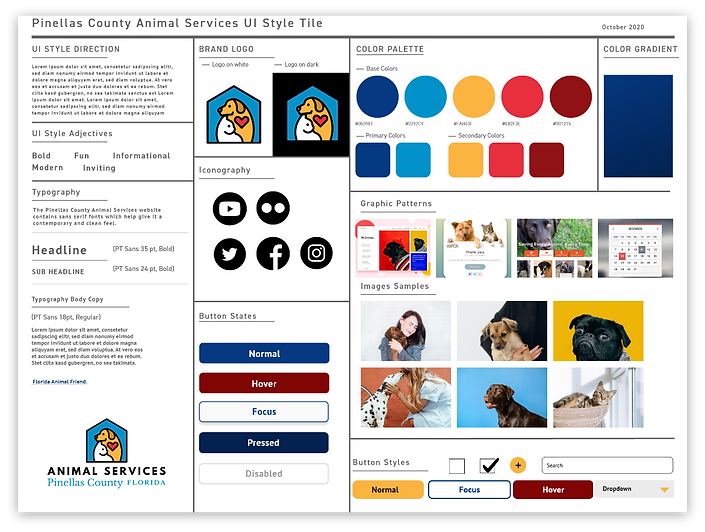
Creating a UI Style tile helped us define the look and feel of the buttons, color pallette, logo, typography, and more.

TESTING AND ITERATIONS
USABILITY TESTING
Once our low-fi was complete,
we conducted usability testing
using 3 basic tasks:
1. Discover where to Adopt a Pet
2. Filter the Pet Results to Display Dogs
3. Complete an adoption application
User Feedback
1. Make ‘Adoption’ more prominent on the homepage.
2. Add a progress marker to the adoption form.
3. Add a happy pet image to the confirmation page.
4. Add breadcrumbs to the website.
5. Add a personality/temperament blurb about each pet.


ITERATED HIGH-FI PROTOTYPE (DESKTOP)

RESPONSIVE DESIGN

FUTURE OPPORTUNITIES
In our second phase of development we’d like to:
1. Add a carousel of pictures to each pet profile. Add videos or a live stream of the pet to view as well.
2. Create a spotlight on the homepage that showcases the pet of the week.
3. Add a calendar for the user to schedule a date to meet an adoptable pet.
4. Create a ‘Favorites’ list by adding a heart icon next to each pet’s picture.
5. Application Started/Adoption Pending banner on the pet profile.
6. Add a description including personality traits, background, health issues, phobias, behavior, etc.